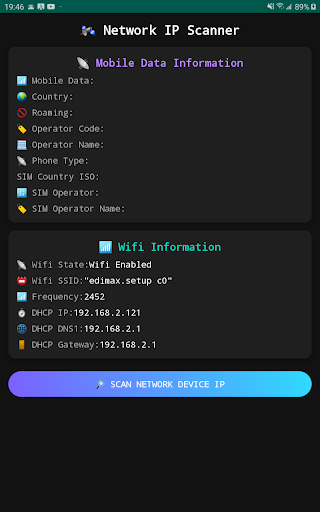
Wi-Fi IP scanner with mobile network info and easy-to-read UI.
📡 Network IP Scanner – Fast and Simple Wi-Fi Scanner
This app helps you quickly scan devices connected to your current Wi-Fi network. It also displays mobile network and Wi-Fi connection details in a clear and modern interface.
🔍 Key Features ✅ Mobile & Wi-Fi Info • Displays SIM card and mobile operator details • Shows network type (GSM), roaming status, country code • Wi-Fi state, SSID, frequency (2.4GHz / 5GHz), local IP, DNS, and gateway
✅ Local IP Scanner • Scans your local Wi-Fi subnet for connected devices • Shows IP addresses of all devices found • Tries to identify iPhone/iPad or Windows PC devices • Uses recognizable icons and labels for quick identification
✅ Modern User Interface • Redesigned UI for better readability and navigation • Simple design for fast access to network information • Suitable for both beginners and tech users
⚠️ Notes • Scanning may not work on shared mobile hotspots (tethering) • Firewalls, antivirus software, or restricted networks may block scan results • Some devices may appear as "Unknown" if they cannot be recognized • Identification is based on best-effort detection
🆕 What’s New in v2025.07 • Improved UI with enhanced layout and contrast • DHCP details now include IP, DNS, and gateway info • Better detection of Apple and Windows devices • Compatibility improvements for more Android models • Bug fixes and performance improvements
This app is lightweight, fast, and requires no special permissions beyond Wi-Fi access. Perfect for checking your home or office network!
📥 Download Network IP Scanner now and find out what’s connected to your network.