Secure Folder – Keep Your Data Private & Protected
Secure Folder – Hide Photos, Videos, Docs & More
Protect your privacy with Secure Folder, a powerful and easy-to-use privacy app designed to lock away your sensitive data. Whether you want to hide private images, secure important documents, or store confidential notes – Secure Folder keeps everything safe behind a secure lock screen.
🔐 Powerful Privacy Features:
• Hide Photos Videos Keep your personal media hidden from the gallery and file manager.
• Secure Documents & Files Lock Word, PDF, Excel, and other document types with encryption-level protection.
• Private Contacts & Notes Store sensitive contacts and personal notes in a secure vault.
• Audio Locker Hide and manage your private voice notes or recordings safely.
• Recycle Bin Support Easily recover deleted files – no more accidental loss.
• Intruder Selfie Capture photos of anyone who tries to break into your vault with the wrong password.
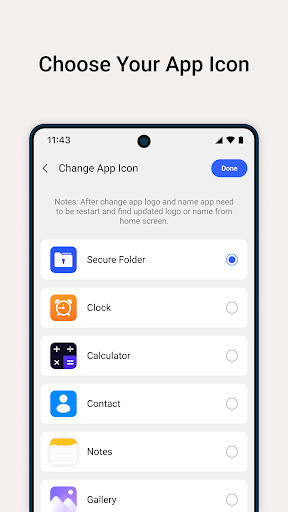
• Custom App Icon Disguise the app with a different icon from a predefined selection – make it blend in with other apps.
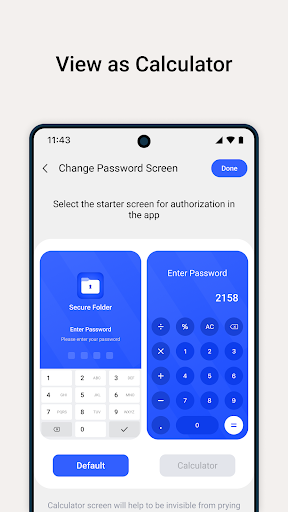
• Two Lock Screen Styles Choose between PIN or Calculator lock to suit your personal security preference.
• Fingerprint Unlock Support (If device supported) Quickly unlock your vault with fingerprint authentication.
• Lightweight & Battery Friendly Designed to be fast, secure, and efficient without draining your battery.
🛡 Why Choose Secure Folder?
• 100% privacy – we do not collect or store any personal data • Ad-free option available (if applicable) • Regular updates with new features and improvements • User-friendly design with a clean and intuitive interface
📌 Important Notes:
• Make sure to back up your data before uninstalling the app – files hidden in Secure Folder may be lost if the app is uninstalled without restoring them first. • For best protection, enable fingerprint unlock (if supported by your device). • Secure Folder does not upload any data to the cloud – everything remains on your device.
Take full control of your privacy. Download Secure Folder today and keep your personal data safe from snoopers!